Sometimes we write about something for months without really noticing it — a person, a project, an idea that keeps coming back.
Deeditt could already find these themes inside your Memories. In this release, we’re taking the next step: you can now open a thread and explore its full history.
Your threads now have a history
From “Insights”, you can tap any thread to see when it appeared in your journal. The new view shows a year-by-year calendar, with each day changing in intensity depending on how much you wrote about that topic: a single mention appears lighter, while several mentions stand out more clearly.
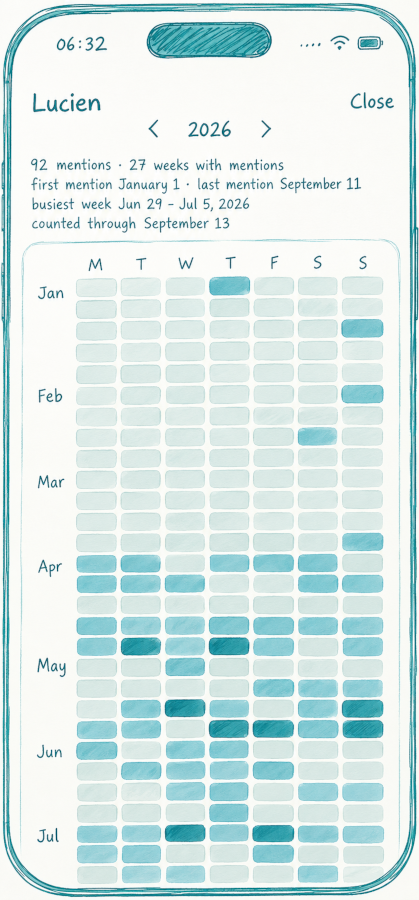
And if you want to remember what happened, simply tap the day and Deeditt will open that journal entry directly. The idea is simple: a thread should be more than just a number. It should become a way to return to the moments that shaped it.
Thread history is part of Deeditt Pro.
“Assisted Deeds” no longer replaces your text
We’ve also changed quite a bit about how Assisted Deeds works. Before, asking for a new version of something you’d written could feel like replacing what was already there. Now it works more like a conversation.
Your draft always stays at the bottom, while each suggestion appears separately in the chat, showing the tone that was used. You can try one tone, then another, refine the same text again, and compare the different versions before deciding which one you prefer.
You can now edit your comments
This was one of those small things that had been missing. If you wrote a comment and later notice a mistake or want to explain yourself better, you can now edit it while the deed is still accepting comments.
Open the comment menu, tap Edit, and your text will appear again in the comment box.
We’ve also improved a few things around conversations: when you delete a comment, it disappears from the list immediately and the counter updates without taking you away from the screen.
A few smaller things that make Deeditt better
This release also includes several changes that probably don’t need a section of their own, but make the overall experience a little better.
Glass effects now display correctly again on iOS.
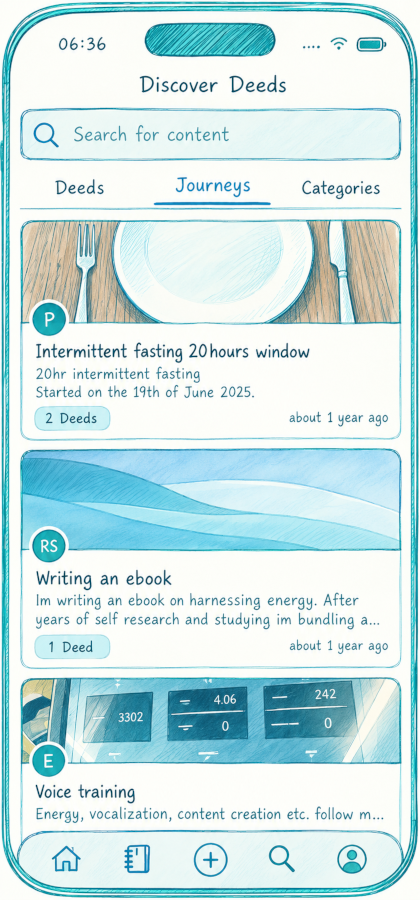
Search is starting to feel more like a place to explore Deeditt. From the start, you’ll find recommended deeds, journeys to discover, and categories. Categories now have their own cards, and you can open any of them to explore its deeds — something that was previously only available on the web.
Journey cards also have a new design, with the image at the top and the content placed on a solid panel so the text stays readable regardless of the photo.
We’ve also updated the welcome screens so they better describe what Deeditt is trying to be today:
a place where you can write privately, return to your words with some distance, and share when you genuinely have something you want to share.